
Meesho Label Smart Cropper
Auto-Splits Label & Tax Invoice
Upload Meesho Label PDF
Supports standard Meesho layout with Product Details & Tax Invoice.
Crop Settings
Smart Detection: “Tax Invoice”
Auto-Detected
Label detected above the “Tax Invoice”. Invoice bottom whitespace will be trimmed.
Suggested Tools For You 👇
Meesho Shipping Label Cropper
The Meesho Shipping Label Cropper is a smart online tool that automatically detects and trims the shipping label from Meesho PDF files.
It creates a clean, printer-ready 4×6 label — fast, secure, and fully browser-based with no uploads.
We Have Also More E-Commerce Website Label Cropper
➡️Amazon Shipping Label Cropper – Click Me
➡️Fliipkart Shipping Label Cropper – Click Me
How to Use Meesho Shipping Label Cropper ?
- Click “Select PDF File” and upload your Meesho shipping PDF.
- The tool will automatically detect the label area, remove blank space, and separate unnecessary invoice sections.
- Download the clean, cropped 4×6 thermal-printer-ready label compatible with TSC, Zebra, and all standard label printers.
Features of Meesho Shipping Label Cropper
- ⚡ Fast Processing — instantly crops Meesho labels
- 🧠 Smart Auto-Detection of label content
- 🔒 100% Safe — no uploads, fully client-side processing
- 🖨 Thermal Printer Ready 4×6 output
- 📄 Bulk PDF Support for multi-page Meesho orders
- 🎯 No watermark, no login, no signup required,no install
- 💯 Completely free to use for all sellers
Compatibility Table Of Meesho Label Cropper
| Meesho PDF Labels | ✔ Supported |
| Bulk / Multi-Page Orders | ✔ Supported |
| Thermal Printers All Type | ✔ Compatible |
| Invoice Removal | ✔ Auto-detected |
| Supported Browsers | Chrome, Safari, Firefox, Edge |
| Device Support | PC, Laptop, Mobile & Tablets |
Frequently Asked Questions (FAQs)
Yes, the tool uses a AI smart detection system that identifies multiple Meesho label layouts accurately.
No. All processing happens locally inside your browser, ensuring full privacy and security.
Yes, the tool works smoothly on mobile phones, tablets, laptops, and desktops.
Absolutely. The tool generates perfectly cropped 4×6 labels ready for TSC, Zebra, and other thermal printers
Yes. The tool processes each page and extracts labels individually for bulk orders.
Yes, it is 100% completely free with no hidden charges.
How to Crop Meesho shipping labels online ? User Interface
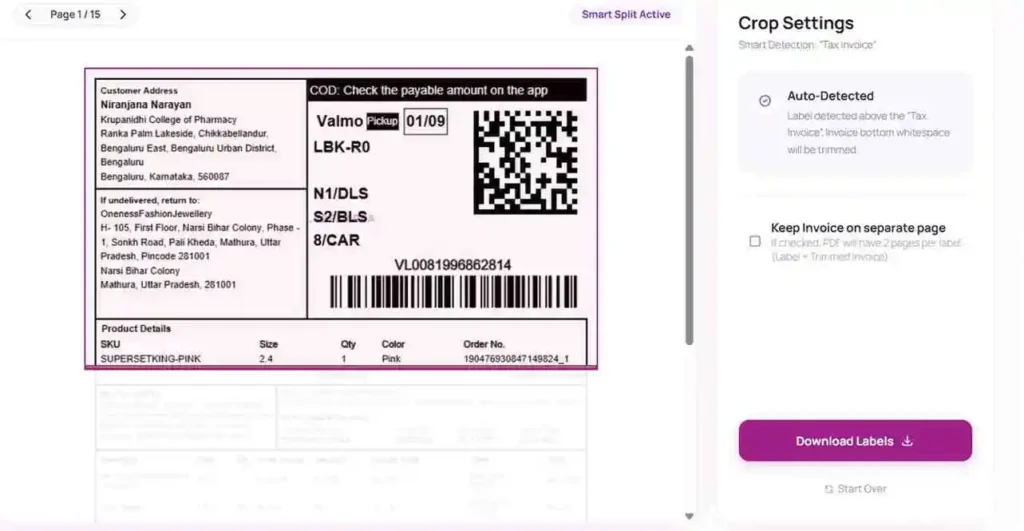
How To Crop Meesho Labels ?
Meesho sellers often struggle with non-standard label sizes that waste paper and time. With the WebTools Deck AI-Powered Meesho Shipping Label Cropper, you can convert your bulk order PDFs into clean, professional shipping labels instantly.
- Smart Detection: Specifically optimized for Meesho’s unique label and tax invoice combined formats.
- No Upload Privacy: Your business data is safe with us. Since there is No Upload to any server, your information remains private and secure.
- 100% Free And Secure: A professional-grade AI-Powered tool available to all Meesho entrepreneurs at zero cost.
Instructions to use:
- Upload Your Labels PDF containing your Meesho shipping labels.
- WebTools Deck AI-Powered Meesho Shipping Label Cropper will automatically crop your label and you can easily download and print.
- Save time and reduce printing costs with perfectly aligned labels.