
Powerful Tools. Beautifully Simple.
Most SEO Friendly Flipkart Label Cropper: Instant 4×6 extraction.
Export
Optimized for Thermal Printing
Note: All processing happens locally in your browser. No files are uploaded to our servers.
Suggested Tools For You 👇
Flipkart Shipping Label Cropper
The Flipkart Shipping Label Cropper is a fast and intelligent online tool designed to extract clean, print-ready labels from Flipkart PDF files.
We Have AI Detection System that auto-detects the label area, trims unwanted sections, and generates a perfect 4×6 thermal label — all inside your browser, with no file uploads.
✔️For Amazon labels, you can also try our Amazon Shipping Label Cropper here: Click Me
✔️For Meesho labels, you can also try our Meesho Shipping Label Cropper here: Click Me
Our advanced AI algorithms provide high-accuracy processing for all your online web tool needs.
Get unlimited access to the best free online utility with no hidden costs or subscriptions required.
Secure browser-based tool featuring SSL encryption for safe and protected digital file processing.
We prioritize user privacy. All uploaded files are instantly deleted after real-time cloud processing.
Experience blazing fast performance with optimized servers for instant file downloads and results.
A simple interface optimized for maximum user experience across all modern web browsers and devices.
How to Use Flipkart Shipping Label Cropper?
- 👉 Click “Select PDF File” and upload your Flipkart-generated shipping label PDF.
- 👉 The tool will automatically detect the label through AI & remove borders, cut out invoice sections, and clean unnecessary whitespace.
- 👉 Download the final 4×6 thermal-printer-ready label, perfectly compatible with Zebra, TSC, and other shipping printers.
Features of Flipkart Shipping Label Cropper
- ⚡ Ultra-fast label cropping for Flipkart sellers
- 🧠 Smart auto-detection of label boundaries
- 🔒 100% secure — no uploads, no server processing
- 🖨 Optimized 4×6 output for all thermal printers
- 📄 Supports single and multi-page PDFs
- 🎯 No signup, no installation, no watermark
- 💯 Completely free and browser-based
Compatibility Table
| Flipkart PDF Labels | ✔ Supported |
| Bulk / Multi-Page PDFs | ✔ Supported |
| Thermal Printers (TSC / Zebra) | ✔ Compatible |
| Invoice/Extra Section Removal | ✔ Auto-detected |
| Supported Browsers | Chrome, Safari, Firefox, Edge |
| Device Support | PC, Laptop, Mobile |
Frequently Asked Questions (FAQs)
Yes. The tool supports multiple Flipkart formats and detects the label content automatically.
No. All processing happens locally in your browser, ensuring complete privacy.
Yes, it works smoothly on mobile phones, tablets, and desktops.
Yes. It produces a perfectly cropped 4×6 label, ideal for Zebra, TSC, and other printers.
Yes. The tool processes each page independently and extracts proper labels from bulk orders.
Yes, the Flipkart Shipping Label Cropper is completely free with no hidden charges.
Flipkart Shipping Label Cropper User Interface
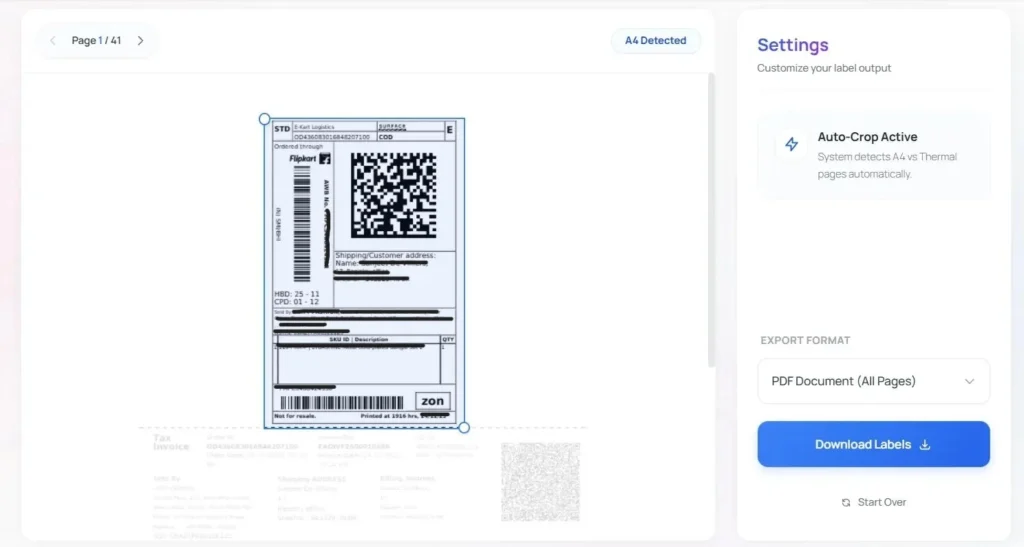
How To Crop Flipkart Labels ?
Managing Flipkart orders can be overwhelming when you have to manually edit PDFs for printing. WebTools Deck AI-Powered Flipkart Shipping Label Cropper is designed to streamline your fulfillment process. Our tool automatically detects the label area from your Flipkart invoices and prepares them for 4×6 thermal printing in seconds.
- AI-Powered Tool: Uses advanced algorithms to identify and isolate shipping labels from complex Flipkart PDF layouts.
- No Upload Security: We prioritize your privacy. The processing happens entirely in your browser; we have a No Upload policy, ensuring your customer data never leaves your device.
- 100% Free And Secure: Enjoy unlimited cropping without any hidden costs or registration requirements.
Instructions to use:
- Upload Your Labels PDF downloaded from the Flipkart Seller Portal.
- WebTools Deck AI-Powered Flipkart Shipping Label Cropper will automatically crop your label and you can easily download and print.
- The output is perfectly optimized for all standard thermal printers.