
How to Crop Flipkart Shipping Labels in Bulk: The Ultimate Guide for Smart Sellers
As a Flipkart seller , you know that every second counts during the peak sale season. One of the most time-consuming tasks is separating the shipping label from the tax invoice in the Flipkart PDF. If you are still using a manual cutter or a basic PDF reader to “Save as Image,” you are losing valuable time and money.
In this guide, we will show you how to use a free online flipkart shipping label cropper to automate your dispatch workflow and print labels like a pro.
The Problem with Standard Flipkart Shipping Labels
Flipkart provides labels in an A4 format where the shipping label occupies only a small portion, and the rest is the customer invoice. This creates several issues for sellers:
✅ Paper Wastage: Printing the whole A4 page for a small package is expensive and environmentally unfriendly.
🚀 Slow Dispatch: Cutting labels with scissors or folding large papers increases the time taken to pack a single order.
🛡️ Scanning Errors: If the barcode is not cropped with high resolution, Flipkart’s Ekart logistics scanners will fail to read it, leading to RTO.
Why Every Seller Needs a Free Online Flipkart Shipping Label Cropper
Using a specialized free online flipkart shipping label cropper is not just about cropping; it’s about business optimization.
Automation: Process 100+ labels in less than 30 seconds.
Thermal Ready: Automatically convert A4 PDFs into 4×6 inch formats perfect for thermal printers like TSC or Zebra.
Cost Cutting: Fit up to 4 labels on a single A4 sticker sheet to save 75% on your stationery bills.
Step-by-Step: How to Crop Flipkart Labels on WebTools Deck
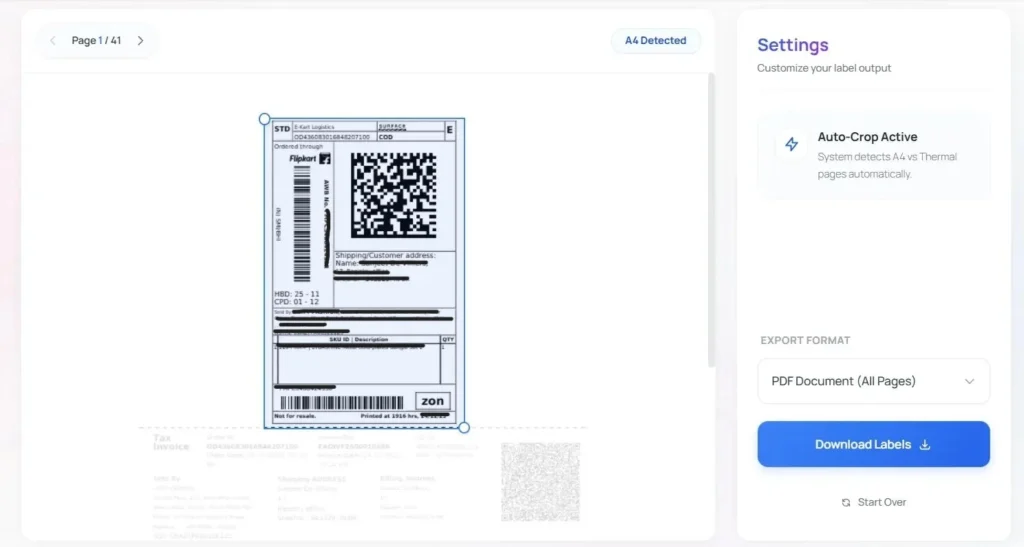
Our tool at WebTools Deck is designed to handle Flipkart’s complex layout with AI precision. Here is how you can do it:
✅ Download Labels: Go to your Flipkart Seller Hub and download the shipping labels for your “Ready to Dispatch” orders.
✅ Upload to Tool: Open the Flipkart Label Cropper and drag your bulk PDF.
✅ Set Dimensions: Choose whether you want a Thermal 4×6 format or a 2×2 grid for A4 paper.
✅ One-Click Process: Click “Crop & Download” to get a clean, barcode-optimized PDF file instantly.
3 Tips to Reduce Flipkart Returns (RTO) with Better Labels
✅ High Contrast Printing: Our cropper enhances the black levels of the barcode so that even low-end printers produce scannable labels.
🚀 Avoid Tape Over Barcodes: If using thermal labels, never put tape over them. The chemical reaction fades the ink, making the label unreadable.
🛡️ Correct Placement: Always place the cropped label on the flat surface of the polybag, not over the edges or curves.
Frequently Asked Questions
Does this tool store my Flipkart customer data?
No, At WebTools Deck, we prioritize security. Your files are processed in real-time and deleted automatically after 60 minutes.
Can I use this for Flipkart and Myntra both?
Yes! Since both use similar logistics structures, our free online flipkart shipping label cropper works perfectly for Myntra labels as well.
What if I have 500+ labels to crop?
Our tool is built for scale. You can upload large files, and our AI-powered engine will process all pages in bulk without crashing.
Conclusion: Professionalize Your Flipkart Business
To grow on Flipkart, you need to think like a brand. Professional, neatly cropped labels not only save costs but also reduce logistics errors. Start using the free online flipkart shipping label cropper on WebTools Deck today and focus on growing your sales instead of cutting paper!
Leave a Reply