
How to Print 4 Meesho Labels on One A4 Sheet to Save 75% on Stationery Costs
As a Meesho seller , managing high order volumes while keeping overhead costs low is the key to profitability. One of the biggest hidden expenses for new sellers is printing stationery. If you are still printing one label per A4 sheet, you are literally throwing money away.
In this guide, we will show you how to use a free online meesho shipping label cropper to optimize your dispatch process and fit multiple labels on a single page. By the end of this article, you will know exactly how to reduce your RTO and save thousands on ink and paper costs.
Why You Should Use a Free Online Meesho Shipping Label Cropper
Printing one label per page is not just a waste of paper; it also slows down your entire packaging workflow. Using a free online meesho shipping label cropper is essential for modern e-commerce growth.
✅ High Ink Consumption: Standard Meesho PDFs contain extra instructions and manifest data that you don’t need for the outer box. Cropping removes this unnecessary data.
🚀 Faster Packaging Speed: It takes longer to fold and tape a full A4 paper onto a small polybag. Smaller labels are easier to apply.
🛡️ Professional Brand Image: Professional sellers use compact, neatly cropped labels that don’t cover the entire product package, giving a better unboxing experience.
The Secret to Reducing RTO with Clearer Shipping Labels
Did you know that blurry barcodes are a leading cause of Return to Origin (RTO) ? When a label is not cropped correctly, the printer often scales it down, making the barcode lines too thin for the courier’s scanner.
By using a high-quality free online meesho shipping label cropper , you ensure that the barcode maintains its original resolution. This leads to a 100% scan rate at the delivery hub. This small change can significantly improve your seller rating and prevent unnecessary returns.
Step-by-Step Guide to Bulk Cropping on WebTools Deck
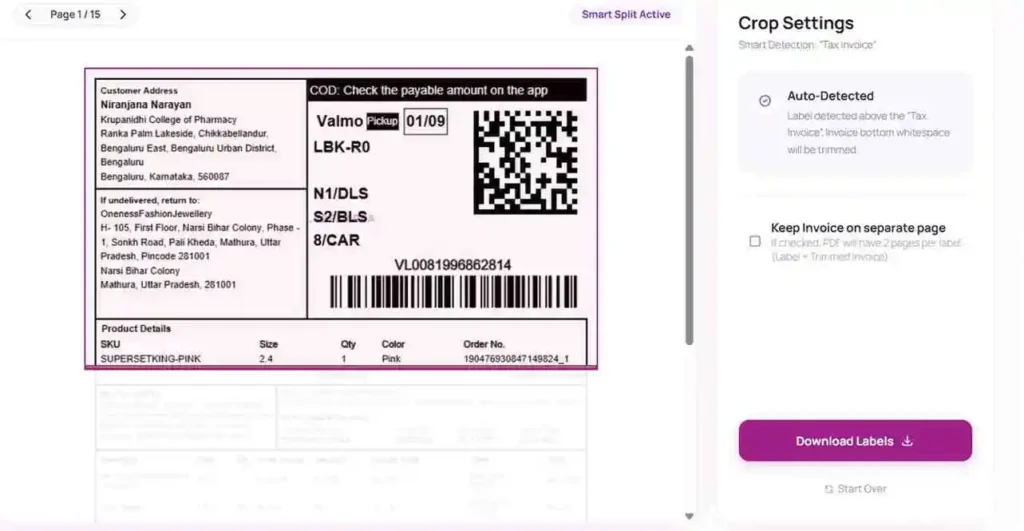
Using the specialized tools at WebTools Deck, you can automate the cropping process. Instead of manually using a “Snapping Tool” for every order, follow these steps:
✅ Download the Bulk PDF: Log in to your Meesho Supplier Panel and download all pending labels in a single PDF.
✅ Upload to WebTools Deck: Go to the free online meesho shipping label cropper tool and drop your file.
✅ Select Layout: Choose the “4 Labels per A4” option for maximum savings.
✅ Download and Print: The tool will give you a single PDF where every page contains 4 labels, perfectly aligned.
Expert Tips for Professional Packaging in 2026
✅ Use Self-Adhesive Paper: If you don’t have a thermal printer yet, use A4 sticker sheets. Just peel and stick.
🚀 Protect the Barcode: Never put transparent tape directly over the barcode if you are using a thermal printer, as it can fade the ink.
🛡️ Check the SKU: Our PDF Cropper ensures the SKU remains visible so your packing team doesn’t make mistakes.
Frequently Asked Questions
Is it safe to use an online tool for my Meesho labels?
At WebTools Deck, we use SSL encryption and all uploaded files are automatically deleted after 60 minutes to ensure your customer data remains private.
Does this tool work for thermal printers too?
Absolutely. You can select the 4×6 inch format if you are using a thermal printer, and the tool will resize the labels perfectly.
Can I crop labels for Amazon and Flipkart too?
Yes. We have dedicated modules like the Amazon Shipping Label Cropper and Flipkart Label Cropper as well.
Conclusion: Scale Your Business with Automation
Efficiency is the difference between a struggling seller and a top-rated one. By moving to a multi-label layout, you save time, reduce waste, and ensure your parcels look professional. Start using our free online meesho shipping label cropper today and take control of your e-commerce logistics.
Leave a Reply